

Built-in languages
These languages are translated for you. No setup is needed.
The built-in text covers the labels in the widget, such as Add to cart, Free Gift!, You save, and Offer ends in.
Regional variants use the language’s translation. For example, a shopper browsing in French (Canada) sees the French text. A shopper whose language is plain Portuguese sees Brazilian Portuguese.
If your store uses a language that isn’t listed, shoppers see English until you add your own translation.
Translate widget and bundle text
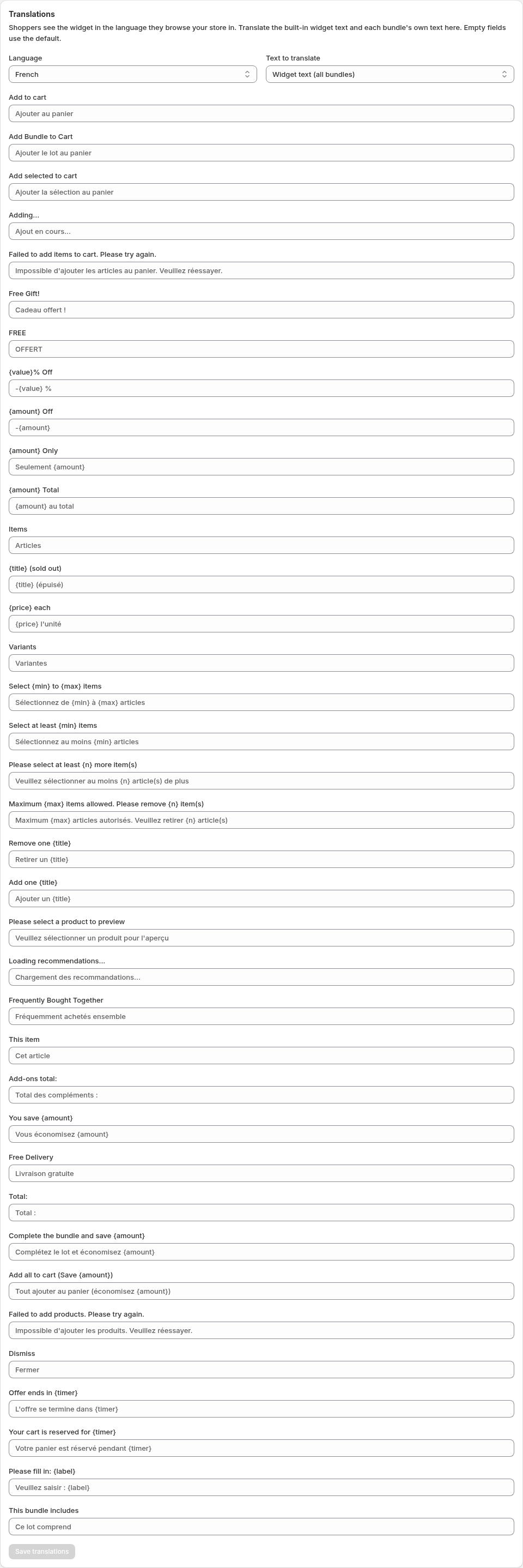
- Go to Settings → Translations.
- In Language, choose the language to translate.
- In Text to translate, choose one of the following:
- Widget text (all bundles) to translate the labels shared by every bundle.
- A bundle name to translate that bundle’s own text, such as its title, badge, button text, footer text, and countdown text. If the bundle has add-ons, you can also translate each add-on’s title and subtitle. For Mix & Match bundles, translate each group heading under Group 1: Title, Group 2: Title, and so on. The translated heading also appears in the group’s selection instructions.
- Enter your translations and select Save in the save bar.
Leave a field empty to use the default. For a language with built-in support, the default is the built-in translation. If you never changed a bundle’s text from the app’s default wording, other languages show the built-in translation instead of English.